" height="21.74796186902578px" id="t3MdhTE9r" transform="translate(0 0)" width="90.99999762294988px"/></g></svg>)
Technical Insights
Blog
Why Spreadsheets for Legal Analysis Need Native Rendering

Ashish Agrawal
Co-Founder and CTO
Share
You’re Losing Time to Broken Spreadsheet Previews
Spreadsheets are everywhere in legal work. Translation teams review multilingual Excel files side by side. Compliance teams audit financial data in CSV exports. Deal teams reference pricing schedules and exhibits stored in .xlsx files. For most legal departments, spreadsheets are a core part of the daily workflow.
Yet most legal AI platforms treat spreadsheets as second-class content. The typical approach converts them to HTML or PDF before displaying them, breaking the file in the process. Merged cells collapse. Column widths reset. Conditional formatting disappears. Multi-sheet workbooks get flattened into a single page. What you see on screen diverges from what the file looks like in Excel.
These rendering failures create a trust problem. When a platform fails to show you a spreadsheet the way it was authored, you end up toggling between the AI and a local copy of Excel to verify accuracy. For legal teams operating under time pressure, the friction adds up.
Why We Built Native Rendering
Solving this in a browser is a harder problem than it appears. HTML and PDF are static display formats. They strip away the conditional logic, cross-sheet references, and layout rules embedded in the original file. Displaying a spreadsheet the way its author intended requires parsing at the OpenXML level (the same format Microsoft Office uses internally), resolving every style and layout rule, and rendering on a canvas built to handle large workbooks without performance degradation.
Citations add another layer of complexity. Most general-purpose AI products, including ChatGPT and Claude, offer no way to jump from a citation to a specific sheet, row, or cell in a spreadsheet. Among platforms with spreadsheet support, the typical approach relies on an intermediate HTML representation: the AI parses the spreadsheet into HTML, and citations point to locations within the parsed version. Citations end up referencing a lossy copy of the file instead of the file itself. To make citations trustworthy, the platform needs to eliminate the HTML intermediary entirely and navigate directly within the original spreadsheet view, down to the specific sheet, row, and cell.
Translation workflows add a performance dimension. Legal translation often involves large, multi-sheet Excel files with thousands of rows. The platform needs to load and render these files quickly enough for reviewers to move through them without delays, even when switching between sheets or jumping between cited cells.
Your Excel files, in Full Fidelity
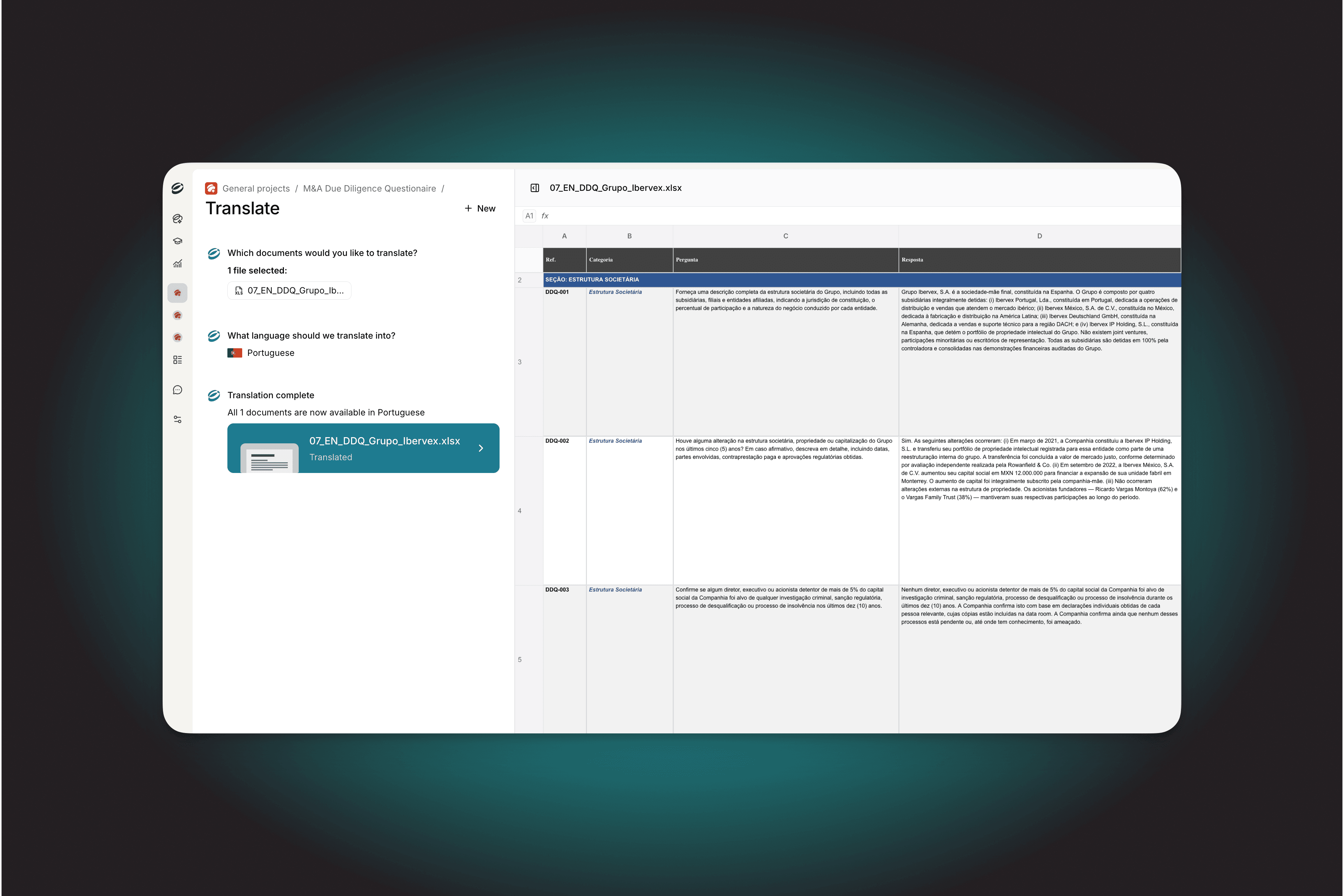
We now render Excel and CSV files natively in the browser, preserving the original document exactly as authored. Cell styles, merged cells, column widths, freeze panes, charts, images, and conditional formatting all display correctly. Multi-sheet workbooks show navigable sheet tabs.
The file you see in Eudia is the file you have on disk. Every cell, every merged range, every formatting rule, exactly as authored.
We parse files server-side using the same OpenXML SDK Microsoft uses, then render on a high-performance canvas grid built to handle workbooks with over a million cells. For large translation files, sheets load incrementally so reviewers start working before the entire workbook finishes loading.
The native renderer also removes the HTML intermediary from citation handling entirely. Citations now navigate directly within the Excel view. Click a citation, and the viewer switches to the correct sheet, scrolls to the referenced cell, and highlights it. The AI source reference and the user verification happen in the same view, on the same file.
Faster, More Accurate Reviews for Your Team
Translation teams reviewing multilingual Excel files now work entirely within Eudia. The original layout is preserved, large multi-sheet files load quickly with incremental sheet loading, and reviewers no longer need to open the file locally to confirm formatting survived.
The same fidelity benefits compliance and regulatory teams. Auditors working with financial data, risk classifications, or regulatory filings in spreadsheets trace AI conclusions back to the exact source cell. Cell-level citations make audit trails concrete.
For deal teams and in-house counsel, the update means schedules, exhibits, pricing tables, and data room files render the way they expect from Excel, inside the platform where they do the rest of their work.