

Tabular Analysis, now in Eudia

Most complex analysis starts with a large set of files and runs through a table someone built by hand.
Legal teams know the pattern better than anyone. Someone gets a document folder, opens a file, finds the relevant term, types it into a cell, and moves on to the next one. The terms sit in a different place every time.
As the set gets more complicated, in scale and in format, so does the analysis. The scan of a twenty-year-old paper lease takes a page-by-page read, and the Excel rent schedule takes a cell-by-cell check. The recorded call where the landlord agreed to the concession takes a full playback. Each format asks for its own kind of attention, and manual review works until a large enough set of files takes longer to process than the team has time for.
Introducing Tabular Analysis in Eudia
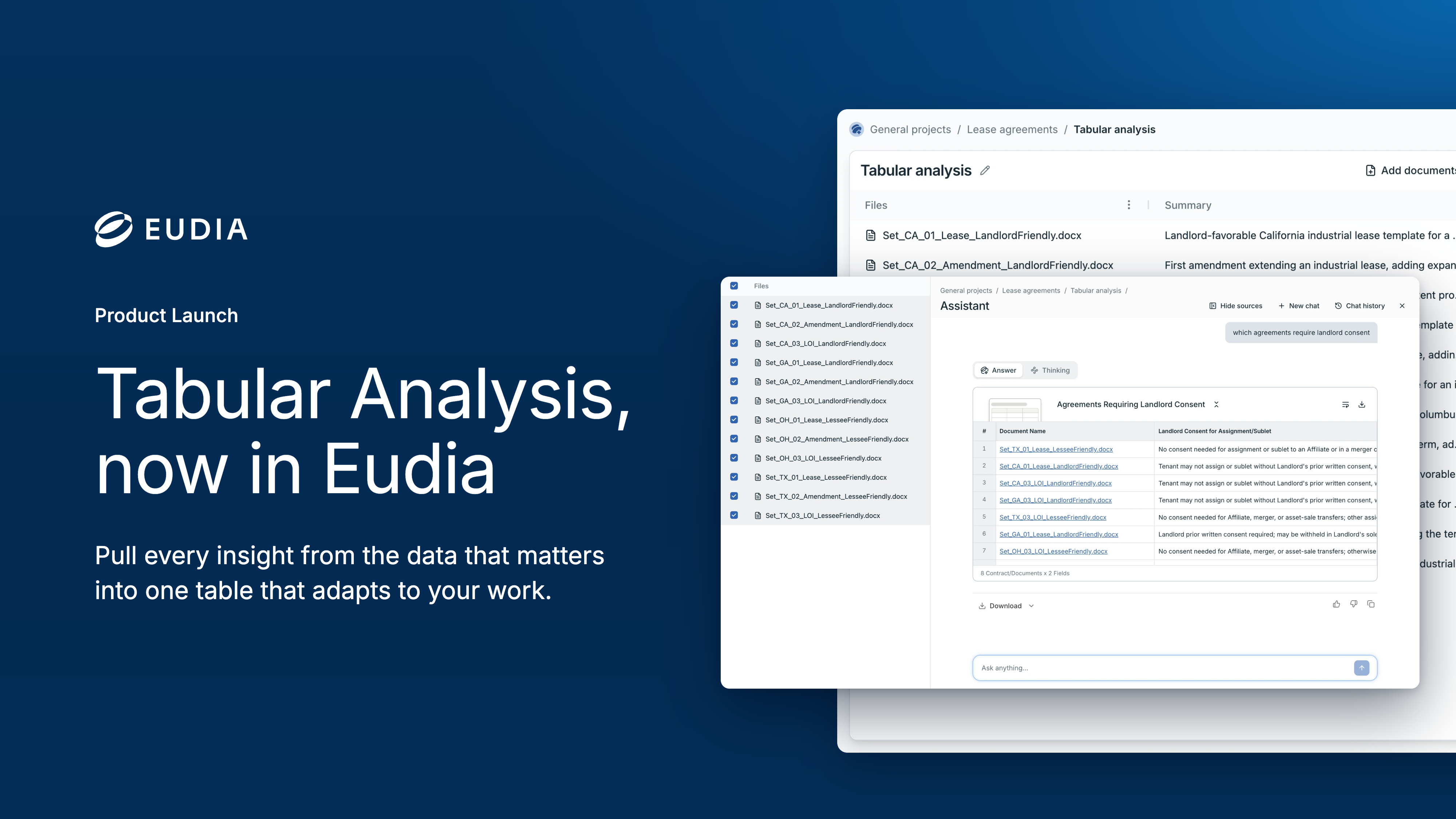
Tabular Analysis extracts every insight you care about from the files behind your work, automatically and across multiple formats. Select the files and choose the terms you track, from a prebuilt library of legal and business concepts or by describing them in your own words. Every file becomes a row, every concept becomes a column, and each finding links back to its source.
Take a company with a few hundred leased sites and a counsel who has abstracted every lease by hand since the first one. Across twenty-five years of files, the early leases are scans, some amendments carry handwritten riders, rent schedules live in Excel, and the facilities team sends walkthrough videos when something goes wrong. A renewal question from the CFO used to mean a week in the archive.
With Tabular Analysis, the counsel picks from the real estate concepts available out of the box or creates their own. Findings from the scanned leases, the handwritten riders, the rent schedules, and the walkthrough videos fill each column. When a cell looks off, one click opens the citation to its exact location in the source file. New files go into the same table without a rebuild, and when the CFO’s question arrives, the counsel selects the relevant rows, asks the Eudia Assistant, and gets a comprehensive answer with precise source references.
The same flow fits anywhere a team has more files than hours, whether a deal team gridding a data room or a compliance team turning supplier questionnaires, certifications, and audit photos into an ESG table with sources. Tabular Analysis also serves the teams that legal works with. Procurement can run it across RFP responses and vendor certifications. Finance can run it across invoices and audit support, and HR across policy acknowledgments.
Every format, one table. Tabular Analysis pulls findings from Word documents, PDFs, scans, handwritten notes, presentations, Excel workbooks, images, audio, and video into the same analysis, so different formats stop requiring separate review processes.
Built for the whole set. A single analysis spans tens of thousands of files, whether documents, audio, images, or spreadsheets, so the table covers the full portfolio rather than the slice someone had time to abstract.
Built to grow with your work. Add files and the existing columns run on them. Add a column and it runs across every file already in the table. The analysis stays current without being rebuilt.
Tabular Analysis is available now to all Eudia customers. To see it in action, schedule a demo with our team.